Requirement Versions, Baseline and History
- Deepak Jangid (Deactivated)
- Pritam Kumar
Owned by Deepak Jangid (Deactivated)
Last updated: Oct 11, 2022 by Pritam Kumar
The Operations available to users are all specified in Requirement Operations. This section will focus on the need/context of such functionality.
In large systems, Requirements creep is a major problem and most often the prime reason for failure to meet a Project's Schedule, Cost and Quality constraints. While following modern practices like Scrum may deliver results in a Sprint, the long term impact on the overall project may remain hidden from the view. In a nutshell, it is important to
- Control change, and be able to evaluate the impact, wherever the changes take place.
- Baseline an agreed upon set of Requirements, between two parties.
Requirement Versions
Key points to note in RMsis,
- The Requirement Versions are separate database records, even though they may have the same reference numbers.
- A Version Number is appended to the Reference Number within curly braces.
- User has to explicitly commit a version.
- User can create a new copy of a committed version.
- When new versions are created, user has to explicitly ensure the validity of dependencies and links.
Requirements Baseline
Typical User Scenario
- The project team selects a set of requirements for a Sprint.
- The chosen requirements are debated upon, and modified on an ongoing basis.
- The team gradually builds consensus on requirements.
- When there is a universal agreement, the agreed upon requirements are baselined.
Creating Baseline in RMsis
- For all the chosen requirements
- Identify (within the team) a requirement for review, discussion, and update.
- "Mark for Baseline", when consensus is built on the chosen requirement.
- When all the chosen requirements have been "Marked for Baseline", open up the set for final review by the team.
- Resolve issues, in case of any comments.
- If the team has no further comments, Requirements Manager will "Create Baseline" from all the requirements "Marked for Baseline".
Viewing a Baseline
All entities associated with a baseline can be viewed by selecting the target Baseline from the drop-down list.
Requirements History
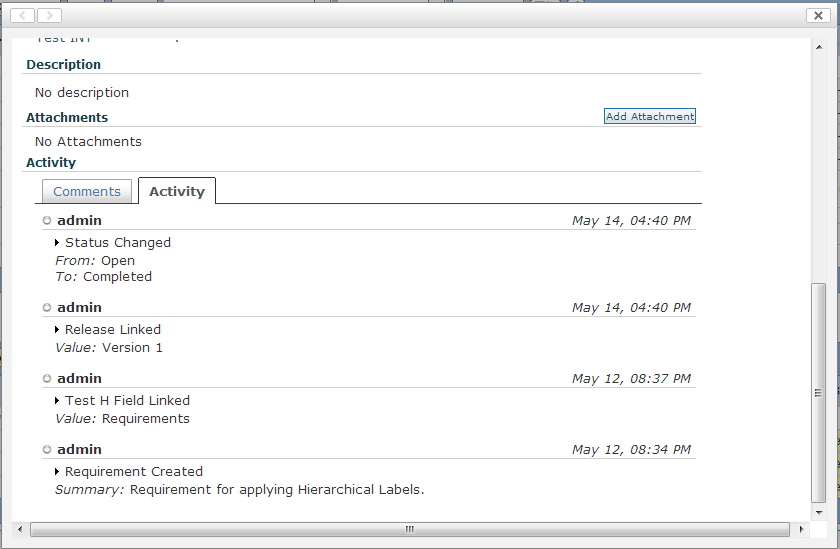
Requirements History is available with the detailed view of each Requirement, as shown below:
, multiple selections available,
© Optimizory Technologies Private Limited